
अगर आपने बिहार RTPS या ServicePlus के माध्यम से जाति, आय, निवास, EWS, NCL या किसी दूसरी सरकारी service के लिए आवेदन किया है और application approve हो चुका है, तो अगला सवाल अक्सर यही होता है—RTPS certificate download कैसे करें?
Bihar ServicePlus में certificate प्राप्त करने के लिए केवल एक रास्ता नहीं है। Official portal के अनुसार certificate या sanction letter applicant को SMS download link, Email attachment, DigiLocker, ServicePlus Inbox, portal के Download Certificate option, Kiosk, CSC या Public Service Centre (RTPS Counter) जैसे माध्यमों से मिल सकता है।
इसलिए अगर आपको SMS नहीं मिला, तो इसका मतलब यह जरूरी नहीं कि certificate जारी नहीं हुआ।
सबसे पहले application status देखें। अगर certificate/service delivery complete हो चुकी है, तो official ServicePlus के available download channels में certificate खोजें।
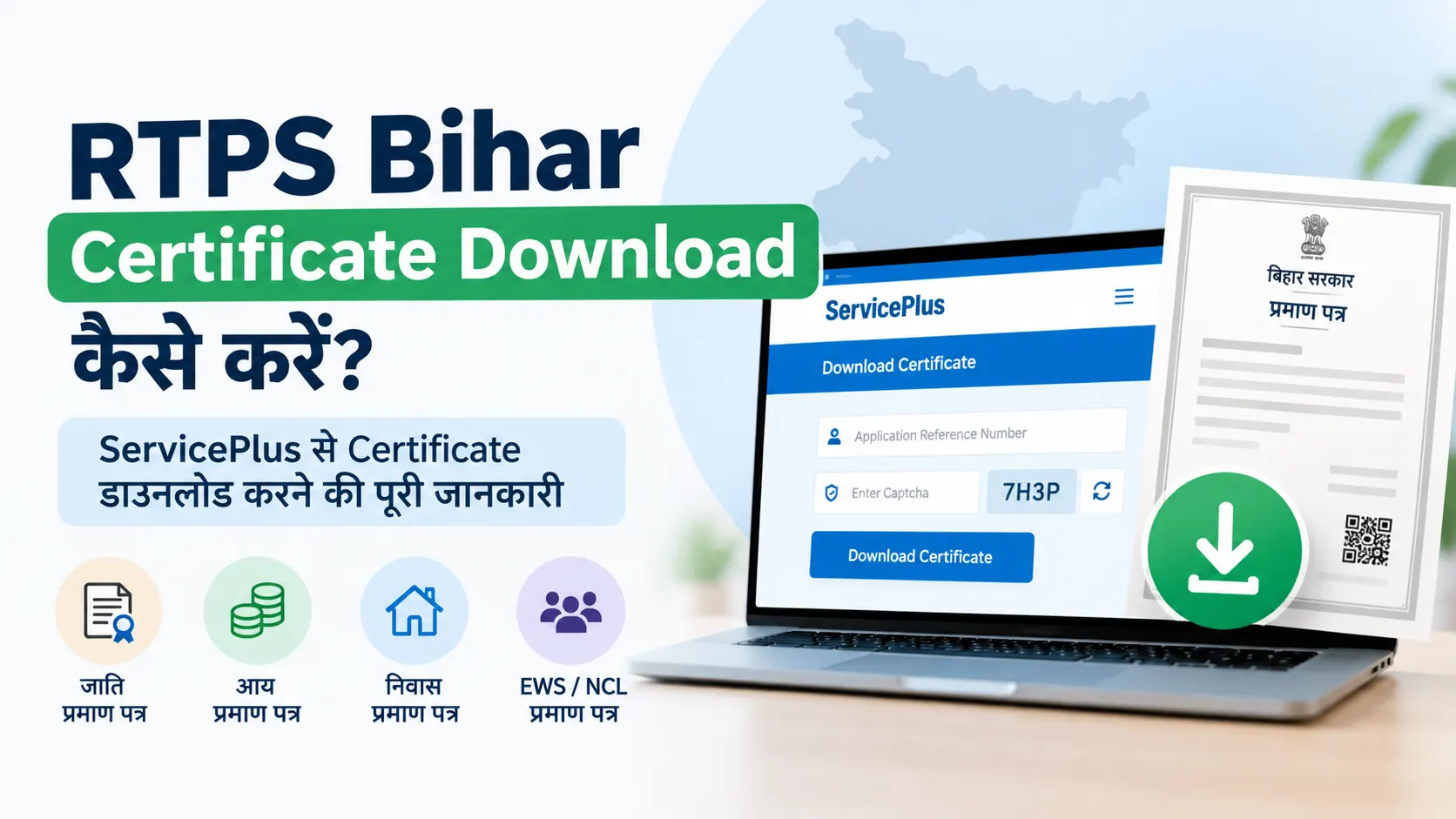
सीधा जवाब: Bihar ServicePlus का official Download Certificate page Application Reference Number और captcha के माध्यम से certificate download करने की सुविधा देता है। इसके अलावा issued certificate SMS, Email, DigiLocker और ServicePlus Inbox जैसे channels से भी उपलब्ध हो सकता है।
RTPS Certificate Download करने से पहले क्या जरूरी है?
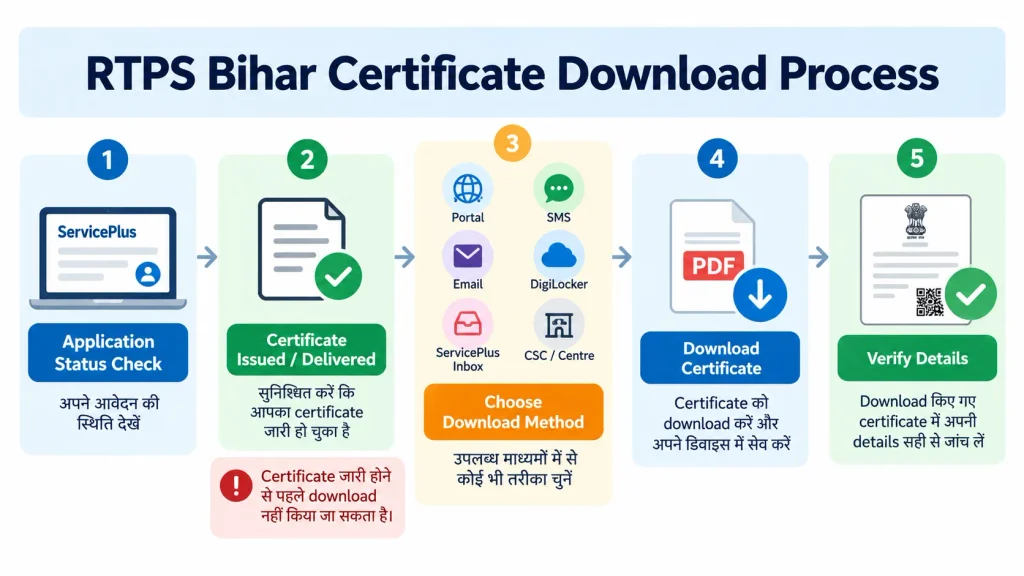
Certificate download करने से पहले सबसे महत्वपूर्ण चीज है कि आपका certificate जारी हो चुका हो।
अगर application अभी:
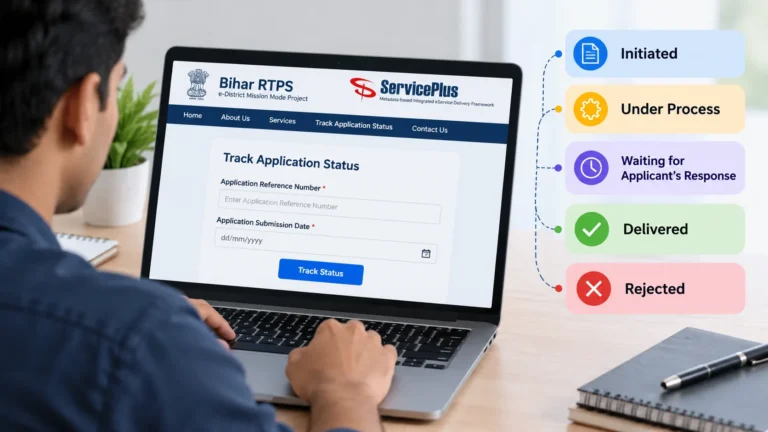
- Initiated
- Under Process
- Waiting for Applicant’s Response
- या किसी अन्य processing status
में है, तो केवल download page खोलने से certificate उपलब्ध होना जरूरी नहीं है।
पहले application status verify करें।
Bihar ServicePlus portal applicants को application status track करने की सुविधा देता है और certificate issuance के बाद कई delivery methods उपलब्ध कराता है।
आपको सामान्यतः ये details संभालकर रखनी चाहिए:
- Application Reference Number
- Application submission information
- Registered mobile number
- Registered email, यदि दिया गया हो
- Application acknowledgement
RTPS Bihar Certificate Download करने के मुख्य तरीके
Certificate जारी होने के बाद आपको निम्न options मिल सकते हैं:
| तरीका | कब उपयोगी है |
|---|---|
| Download Certificate page | Reference Number उपलब्ध है |
| SMS Download Link | Registered mobile पर link आया है |
| Email Attachment | Certificate email में भेजा गया है |
| DigiLocker | Certificate वहां उपलब्ध हुआ है |
| ServicePlus Inbox | Login करके application किया था |
| Track Application Status | Application record से certificate तक पहुंचना हो |
| CSC / Kiosk | Assisted service से certificate लेना हो |
| Public Service Centre | RTPS Counter के माध्यम से application/delivery हुई हो |
Official Bihar ServicePlus portal इन delivery methods को सूचीबद्ध करता है।
Method 1: Official ServicePlus से RTPS Certificate Download कैसे करें?
यह सबसे सीधा तरीका है, खासकर तब जब आपके पास Application Reference Number है।
Step 1: Official Download Certificate page खोलें
Bihar ServicePlus का official Download Certificate page खोलें।
वहां “Download Certificate” section में reference number और captcha से संबंधित fields दिखाई देती हैं।
Official link: Bihar ServicePlus Certificate Download
Step 2: Reference Number दर्ज करें
अपने application acknowledgement में दिया गया Reference No. दर्ज करें।
Reference number डालते समय ध्यान रखें:
- पूरा number डालें
- extra space से बचें
- 0 और O जैसे characters ध्यान से देखें
- पुराने application का reference number accidentally न डालें
अगर आपका certificate अभी जारी नहीं हुआ है, तो सही reference number होने के बावजूद certificate download नहीं हो सकता।
Step 3: Captcha भरें
Official download page पर captcha दिखाई देता है।
Captcha में जो characters दिखाई दें, उन्हें सही तरीके से enter करें।
अगर captcha स्पष्ट नहीं है, तो page पर उपलब्ध refresh/reload mechanism का उपयोग करें।
Step 4: Download Certificate पर क्लिक करें
Reference number और captcha भरने के बाद Download Certificate option submit करें।
अगर certificate available है और details सही हैं, तो portal certificate download करने की प्रक्रिया आगे बढ़ाएगा।
Download Certificate Page पर Certificate नहीं मिल रहा तो?
यह समस्या कई कारणों से हो सकती है।
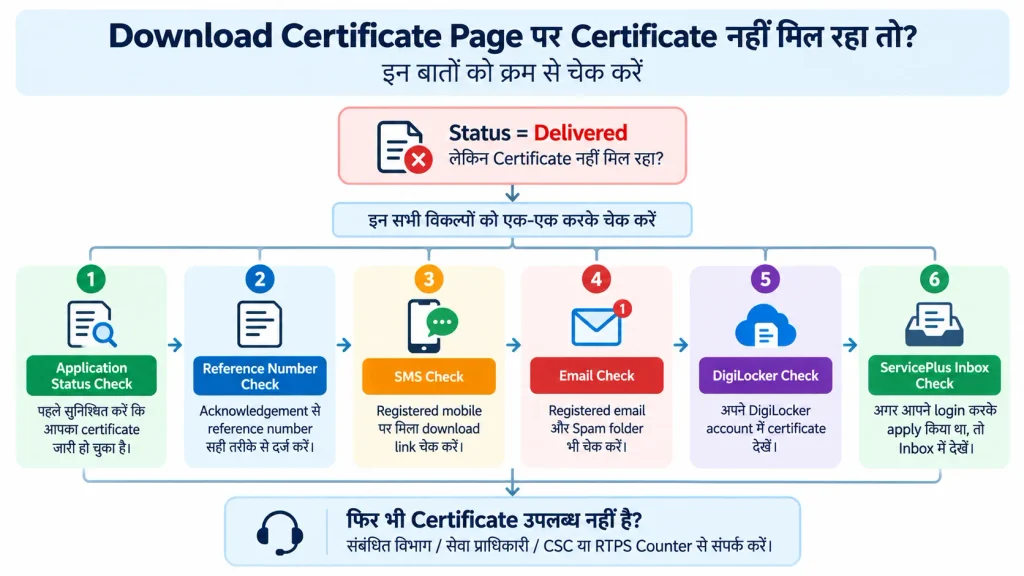
सबसे पहले यह check करें:
1. Certificate वास्तव में issued है?
Application status देखें।
अगर status अभी Under Process है, तो download page पर certificate न मिलना सामान्य हो सकता है।
2. Reference Number सही है?
Acknowledgement से reference number copy करके दोबारा डालें।
3. Application किसी दूसरे service level पर तो नहीं है?
Bihar ServicePlus में कई services अलग administrative levels पर process हो सकती हैं। इसलिए सही application record identify करना जरूरी है।
4. Certificate किसी दूसरे delivery channel से उपलब्ध है?
SMS, Email, DigiLocker और ServicePlus Inbox check करें। Official portal certificate delivery के लिए इन channels का उल्लेख करता है।
Method 2: SMS से RTPS Certificate Download करें
Bihar ServicePlus के अनुसार certificate issued होने के बाद applicant को registered mobile number पर download link through SMS भेजा जा सकता है।
अगर आपको SMS मिला है:
- SMS खोलें।
- Sender और message context verify करें।
- Download link खोलें।
- Certificate उपलब्ध होने पर उसे download करें।
- PDF को सुरक्षित स्थान पर save करें।
SMS नहीं आया तो?
SMS नहीं आने को certificate rejection या non-issuance का proof न मानें।
Official portal कई alternative delivery channels भी बताता है।
आप Email, DigiLocker, ServicePlus Inbox, Download Certificate page और Track Application Status check कर सकते हैं।
Method 3: Email से RTPS Certificate Download करें
Application के दौरान valid email address दिया गया हो तो certificate Email attachment के रूप में उपलब्ध हो सकता है।
Official ServicePlus portal certificate delivery के लिए Email attachment को listed method के रूप में बताता है।
Email check करते समय केवल Inbox न देखें।
इन folders को भी check करें:
- Inbox
- Spam
- Junk
- Promotions, यदि applicable हो
- Updates
Search में application/service से संबंधित terms या ServicePlus-related communication खोज सकते हैं।
Email attachment मिलने पर
Certificate PDF download करके:
- file rename करें
- सुरक्षित folder में रखें
- backup बनाएं
- जरूरत पड़ने पर print निकालें
Method 4: DigiLocker से RTPS Certificate कैसे प्राप्त करें?
Bihar ServicePlus official portal certificate delivery options में DigiLocker को शामिल करता है।
अगर आपका issued certificate DigiLocker में उपलब्ध कराया गया है, तो आप वहां जाकर संबंधित document खोज सकते हैं।
लेकिन एक महत्वपूर्ण बात:
हर application का certificate हर परिस्थिति में DigiLocker में दिखाई देगा, ऐसा universal assumption नहीं करना चाहिए।
अगर DigiLocker में document नहीं दिख रहा है, तो पहले ServicePlus application status और अन्य delivery channels check करें।
DigiLocker में document न दिखने का अर्थ अपने-आप यह नहीं है कि certificate issue नहीं हुआ।
Method 5: ServicePlus Inbox से Certificate Download करें
अगर आपने ServicePlus में login करके application submit किया था, तो issued certificate ServicePlus Inbox में उपलब्ध हो सकता है।
Official Bihar ServicePlus portal स्पष्ट रूप से ServicePlus Inbox को certificate delivery channel के रूप में सूचीबद्ध करता है और यह भी बताता है कि login के बाद apply किए गए applications के लिए Inbox उपयोगी है।
Practical process
- Official ServicePlus portal खोलें।
- अपने account में login करें।
- ServicePlus Inbox खोलें।
- संबंधित application खोजें।
- Application/service details verify करें।
- Certificate उपलब्ध है तो उसे download करें।
अगर आपने बिना login के application किया था, तो Inbox में certificate न मिलने की स्थिति अलग हो सकती है।
Method 6: Track Application Status से Certificate प्राप्त करें
ServicePlus portal पर Track Application Status सुविधा भी available है।
Current official portal के अनुसार application status देखने के लिए Citizen Section में Track Application Status option का उपयोग किया जा सकता है। Application Reference Number और Date के आधार पर status display होता है।
अगर application status Delivered है, तो certificate delivery information को आगे follow किया जा सकता है।
यह तरीका खास तौर पर उपयोगी है जब:
- SMS delete हो गया हो
- Email याद न हो
- certificate issue हो चुका हो
- application reference number उपलब्ध हो
RTPS Certificate Download से पहले “Delivered” क्यों Check करें?
यह एक महत्वपूर्ण distinction है।
मान लीजिए आपने Income Certificate के लिए application किया।
अगर status Under Process है, तो इसका मतलब यह नहीं कि certificate download करने के लिए तैयार है।
अगर status Delivered है, तो certificate delivery stage complete होने की संभावना है और आपको available delivery channels check करने चाहिए।
Official ServicePlus applicant manual में Delivered status से certificate download/print workflow का documented example दिया गया है।
इसलिए:
पहले status → फिर delivery → फिर download
यह ज्यादा practical workflow है।
RTPS Certificate Download नहीं हो रहा है: सबसे पहले क्या Check करें?
अगर download button काम नहीं कर रहा या certificate नहीं मिल रहा, तो यह checklist follow करें।
Check 1: Application status
क्या application Delivered है?
Check 2: Reference number
क्या आपने सही reference number डाला है?
Check 3: Captcha
क्या captcha सही enter किया गया है?
Check 4: दूसरा delivery channel
क्या certificate SMS, Email, DigiLocker या ServicePlus Inbox में उपलब्ध है?
Check 5: Browser
Page properly load नहीं हो रहा तो browser को refresh करें और official portal को दोबारा खोलें।
Check 6: PDF viewer
Certificate download होने के बाद PDF खुल नहीं रही है तो device में PDF reader/browser support check करें।
RTPS Certificate PDF Download हो गई लेकिन Open नहीं हो रही
यह application processing issue से अलग समस्या है।
अगर PDF file download हो गई लेकिन open नहीं हो रही, तो पहले देखें:
- file size zero तो नहीं है
- download complete हुआ या नहीं
- file extension
.pdfहै या नहीं - browser में PDF viewer काम कर रहा है या नहीं
- file दोबारा download करने पर समस्या repeat होती है या नहीं
अगर file corrupt दिखाई देती है, तो दूसरा delivery channel check करना उपयोगी हो सकता है।
उदाहरण: अगर portal download से PDF खराब है, लेकिन वही certificate Email attachment या DigiLocker में उपलब्ध है, तो वहां से copy प्राप्त की जा सकती है।
RTPS Certificate Download के बाद PDF को कैसे सुरक्षित रखें?
Certificate एक important government document हो सकता है, इसलिए केवल phone Downloads folder में रखना पर्याप्त नहीं है।
Download के बाद:
- PDF को एक स्पष्ट नाम दें।
- एक local backup रखें।
- जरूरत हो तो cloud backup रखें।
- Original file को unnecessarily edit न करें।
- Print copy की जरूरत हो तो original PDF से print करें।
- Certificate verification की आवश्यकता हो तो संबंधित official verification mechanism देखें।
उदाहरण: Income-Certificate-2026.pdf या Residence-Certificate-Applicant-2026.pdf जैसा filename future search को आसान बना सकता है।
क्या RTPS Certificate का Screenshot इस्तेमाल कर सकते हैं?
Screenshot और original certificate PDF एक जैसी चीजें नहीं हैं।
अगर किसी college, recruitment process, government office या दूसरे authority को certificate जमा करना है, तो पहले यह देखें कि उन्होंने किस format की मांग की है।
अगर official PDF उपलब्ध है, तो सामान्यतः original digital document को सुरक्षित रखना अधिक उपयोगी है।
Screenshot में:
- पूरा certificate दिखाई न दे सकता है
- reference details कट सकती हैं
- QR/barcode या अन्य information missing हो सकती है
- document authenticity verify करना मुश्किल हो सकता है
इसलिए जहां PDF उपलब्ध है, वहां केवल screenshot पर निर्भर न रहें।
क्या RTPS Certificate की Printed Copy निकाल सकते हैं?
हाँ, certificate download होने के बाद जरूरत के अनुसार उसका print लिया जा सकता है।
लेकिन printed copy की acceptability उस संस्था/service की requirements पर निर्भर कर सकती है जहां certificate जमा किया जा रहा है।
उदाहरण के लिए किसी admission, scholarship, recruitment या government application में document submission rules अलग हो सकते हैं।
इसलिए: “PDF उपलब्ध है” और “हर जगह printed copy स्वीकार होगी” एक ही बात नहीं है।
क्या Certificate Download होने के बाद Verification भी जरूरी है?
यह purpose पर निर्भर करता है।
Certificate download करना document प्राप्त करने की प्रक्रिया है।
Verification certificate की authenticity/details से संबंधित अलग process है।
Bihar ServicePlus portal कुछ specified certificate categories—जैसे Residence, Caste, Income, NCL और EWS—के portal-based verification का उल्लेख करता है और यह भी बताता है कि portal verification issuing authority के final verification के अधीन है।
इसलिए अगर किसी संस्था ने “certificate verification” specifically मांगा है, तो केवल PDF download करके रुकना पर्याप्त नहीं हो सकता।
Digitally Signed Certificate और Downloaded Certificate में क्या अंतर है?
ServicePlus के official officer documentation में certificate issuance के लिए digitally signed document, unsigned system-generated document और ink-signed document जैसे अलग signing methods documented हैं।
इससे यह समझना जरूरी है कि:
हर downloaded PDF को सिर्फ file extension देखकर “digitally signed certificate” नहीं मानना चाहिए।
अगर किसी संस्था ने specifically digitally signed certificate मांगा है, तो certificate पर उपलब्ध signing information और संबंधित authority की requirement check करें।
RTPS Certificate Download के बाद Certificate में क्या Check करें?
Certificate download करने के बाद उसे तुरंत किसी application में upload करने से पहले details verify कर लें।
कम से कम ये information check करें:
- Applicant Name
- Father/Mother/Husband/Wife Name, जहां applicable हो
- Address
- Certificate type
- Issue date
- Reference/Application information
- Issuing authority
- Certificate number, जहां applicable हो
- अन्य service-specific details
अगर किसी detail में spelling mistake या factual mismatch है, तो certificate को edit करके correct करने की कोशिश न करें।
PDF को खुद modify करके official certificate जैसा बनाना उचित नहीं है।
Correction की आवश्यकता हो तो संबंधित official process देखें।
अगर RTPS Certificate में नाम गलत है तो क्या करें?
Certificate download हो जाने के बाद नाम या दूसरी जानकारी गलत दिखाई देती है, तो PDF editing software से correction न करें।
क्योंकि downloaded PDF को edit करने से वह official record में corrected certificate नहीं बन जाता।
इसके बजाय:
- गलत information identify करें।
- Original application details से compare करें।
- Issuing authority/service-specific correction mechanism देखें।
- जरूरत पड़ने पर official grievance या correction process अपनाएं।
यह खास तौर पर महत्वपूर्ण है जब certificate सरकारी नौकरी, admission, scholarship, reservation या official verification के लिए उपयोग होना है।
क्या Valid Old RTPS Certificate को दोबारा Download करना चाहिए?
अगर certificate पहले से issued है और valid है, तो केवल इसलिए नया certificate application करना जरूरी नहीं कि आपको दूसरी जगह जमा करना है।
Bihar ServicePlus portal applicants को सलाह देता है कि अगर पहले जारी किया गया certificate अभी valid है, तो नया certificate बार-बार apply करने के बजाय उसी certificate को अलग purposes के लिए उपयोग करें।
इस guidance का practical फायदा है:
पहले से valid certificate है → उसे सुरक्षित रखें → जरूरत के अनुसार उसकी copy/download/print का उपयोग करें।
लेकिन certificate की validity और accepting authority की document requirements अलग-अलग हो सकती हैं। इसलिए specific application की current requirements जरूर देखें।
RTPS Certificate Download में सबसे Common Problems
Problem 1: Reference Number डालने पर certificate नहीं मिलता
पहले application status check करें।
Problem 2: Delivered है लेकिन SMS नहीं आया
Email, DigiLocker, ServicePlus Inbox और portal download check करें।
Problem 3: PDF download हुई लेकिन खुल नहीं रही
File दोबारा download करें या available alternate delivery channel check करें।
Problem 4: DigiLocker में certificate नहीं दिख रहा
इसे certificate rejection का proof न मानें। ServicePlus application/delivery record check करें।
Problem 5: ServicePlus Inbox में certificate नहीं दिख रहा
यह देखें कि application login के बाद किया गया था या किसी दूसरे mode से।
Problem 6: Certificate में details गलत हैं
PDF को edit न करें। Official correction process देखें।
Problem 7: Certificate download के बाद verification चाहिए
Download और verification को अलग processes की तरह समझें।
RTPS Certificate Download के लिए कौन-सा Portal इस्तेमाल करें?
Certificate download के लिए official Bihar ServicePlus portal को प्राथमिकता दें।
Official Download Certificate page: Bihar ServicePlus — Download Certificate
Application status के लिए: Bihar ServicePlus — Official Portal
अगर application delayed/rejected है और applicable appeal process समझना है, तो official RTPS Appeal portal का उपयोग करें।
RTPS Certificate Download: पूरा Process एक नजर में
इसे simple workflow में समझें:
- Application Submitted
- Application Status Check
- Certificate Issued / Delivered
- Download Method चुनें
- SMS / Email / DigiLocker / ServicePlus Inbox / Portal
- PDF Download करें
- Certificate Details Check करें
- जरूरत के अनुसार Print/Submit करें
- जहां आवश्यक हो, Official Verification करें
यह workflow आपको “certificate नहीं आया, फिर से application कर देता हूं” जैसी unnecessary action से बचा सकता है।
RTPS Certificate Download के बारे में FAQs
RTPS certificate online कैसे download करें?
Official Bihar ServicePlus के Download Certificate page पर Reference Number और captcha दर्ज करके download process शुरू किया जा सकता है।
Certificate download करने के लिए कौन-सा number चाहिए?
Official download page Reference No. मांगता है। इसलिए application acknowledgement में दिया गया reference number सुरक्षित रखना जरूरी है।
SMS नहीं आया तो certificate कैसे मिलेगा?
Email, DigiLocker, ServicePlus Inbox, Track Application Status और Download Certificate portal सहित दूसरे available channels check करें।
क्या DigiLocker से RTPS certificate मिल सकता है?
Bihar ServicePlus official portal DigiLocker को certificate delivery channel के रूप में सूचीबद्ध करता है। लेकिन हर certificate हर situation में DigiLocker में उपलब्ध हो, यह assume नहीं करना चाहिए।
क्या ServicePlus Inbox से certificate download कर सकते हैं?
अगर application login के बाद submit किया गया था और certificate वहां deliver किया गया है, तो ServicePlus Inbox से certificate प्राप्त किया जा सकता है।
Delivered status है लेकिन certificate download नहीं हो रहा, क्या करें?
पहले reference number और application status verify करें। फिर SMS, Email, DigiLocker, ServicePlus Inbox और official Download Certificate page जैसे alternate delivery channels check करें।
क्या certificate download होने के बाद नया application करना चाहिए?
सिर्फ certificate की दूसरी copy चाहिए इसलिए नया application करना जरूरी नहीं हो सकता। Bihar ServicePlus valid previously issued certificate को बार-बार नए certificate के लिए apply करने के बजाय reuse करने की सलाह देता है।
क्या downloaded certificate की PDF edit कर सकते हैं?
Official certificate की information को PDF editor से बदलना उचित नहीं है। अगर कोई detail गलत है, तो official correction mechanism अपनाएं।
निष्कर्ष
RTPS Bihar Certificate Download को केवल एक “PDF download” problem समझना सही नहीं है।
पहला सवाल यह है कि certificate जारी हुआ है या नहीं। इसके लिए application status check करें।
अगर certificate issued/delivered है, तो Bihar ServicePlus के कई delivery channels उपलब्ध हो सकते हैं:
SMS → Email → DigiLocker → ServicePlus Inbox → Download Certificate → CSC/Kiosk/RTPS Counter
अगर SMS नहीं आया, तो नया application तुरंत न करें।
अगर DigiLocker में document नहीं दिख रहा, तो इसका अर्थ automatically rejection नहीं है।
अगर PDF download हो गई है लेकिन उसमें गलत information है, तो उसे edit करने के बजाय official correction process देखें।
और अगर किसी authority ने certificate verification specifically मांगा है, तो download और verification को दो अलग processes समझें।
सबसे सुरक्षित workflow यही है:
Status Check → Certificate Issued → Official Download/Delivery Channel → Details Verify → Save/Print → आवश्यकता होने पर Verification
Last verified: 27 September 2026
Primary official source: Bihar ServicePlus / Government of Bihar e-Service portal.
download के बाद certificate की जानकारी जाँचना ज़रूरी है — इसके लिए RTPS certificate verification का तरीका और Caste Certificate की validity देखें।
12 Comments